Thursday, May 29, 2014

Level Design

About half the time when I design a level on Robo-Ninja, I'm moderately dissatisfied with it when I'm finished. It's either too hard, too easy, not interesting enough, or too dependent on getting lucky on your timing instead of actually figuring out how to do it properly.

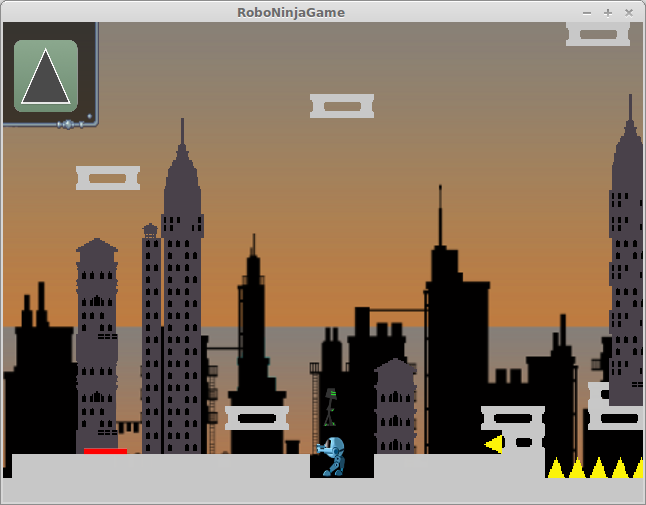
Tonight, I finally built (most of) a level that I'm quite happy with. It's not hard to get through once you figure out the timings and what to do. But it will probably take a few tries to figure out those timings. And the arrangement of elements on the screen isn't as boring as some of the other maps I've done recently.

I've got quite a few levels to go...hopefully I can keep this up.

Just so you know...on my laptop, I have to hold alt + fn + prscr t take a screenshot.
It took a few tries to get this shot without dying.

Tuesday, May 20, 2014

Progress progress progress

So I guess I haven't posted in almost a month. Mainly due to a combination of:

  • Only having about 30 minutes to an hour at any given time to work on RoboNinja, so by the time I get some work done on it, I don't have as much time to talk about it.
  • The kids had "no screen week"in the middle of May, which meant I decided to take a week off from playing on my computer at home. ("playing" including my hobby programming!)
  • I've had more home repairs than usual, so I've been busier in the evenings than I'd like
Anyway, despite all that, I've been still gradually making progress. First, I managed to get the minimap sorted out -- my build script goes through each map file and builds a minimap image once at build time. Then as you go through the world, it copies little sections from that image to a blank image that is gradually built up to be the minimap that the player can see. When the player saves his progress, I just save that image, and keep gradually copying to it. It's a little bit wasteful (copying the image every frame, and saving the whole image with the player's progress), but hey, that's what modern fast processors and nearly-unlimited storage are for, right? (This NEVER would have worked on the puny little Gameboy Advance!)

Then I had to work through some issues where things wouldn't work correctly after toggling out of the game, then restarting it. I'd get a black screen and crashes.  Which turned out to be fairly obvious once I re-read the GDX documentation. All sorts of assets (textures, in particular) require you to pay attention to resource management, instead of just letting java take care of it. You need to manually release textures, and manually recreate them. In particular, toggling out of the game will destroy any textures you've loaded -- but the java object that tracks it remains.  So I had to reload my textures when reloading the game. 

Then I ended up having it mostly working, other than the slide powerup wouldn't work after resuming the game. You'd tap the screen to slide, and RoboNinja would just moonwalk to the right of the screen. It was weird.  This took some debugging, but finally I realized I was creating a 2nd instance of my "powerup" object -- one connected to the UI, and the other connected to the actual in-game character -- so the UI ended up being disconnected from the actual ability.  I had a factory class to instantiate my ability objects from their string ids, and it was happily returning a new instance to the UI when I recreated things. So I just needed to rework the plumbing to make sure that both the UI and the internal game state were using the same object instance.

Once that was done, all the bugs with pausing and relaunching the game seemed to be worked out.

Now I've started working on the "City" themed levels, which include an enemy robot that shoots lasers at you. I'm trying to set it up so that you can get through it if you haven't found some of the powerups in neighboring levels, but that it will be significantly easier if you do. It's taking some tweaking to get that difficultly level set. 

Here I go dying again. I do that a lot.

Wednesday, April 30, 2014

GDX 1.0

Well, after I said that I wasn't going to bother getting the gradle build working, it's time to eat my words.

About a week or so ago, Mario (the man behind libGdx) announced that they finally were officially releasing version 1.0 of libGdx. I've been dragging my feet about trying to keep up with changes to the library, as it's not completely backwards-compatible, and I didn't want to get on the treadmill of trying to keep changing my code to stay up-to-date. But after some consideration, I figured a 1.0 release was worth migrating to.

The biggest change between my old version (from about a year ago) and 1.0 was the directory structure and build scripts for your game. Like I mentioned before, they switched to a gradle-based build system (which is quite nice), and with that came some rearranging of the project directories.
libGDX has this cute little project creation UI that you can use to get everything set up correctly.

I figured the easiest route would be to create a new blank project using their nice project creation tool, then move all my code into the right places in it, and see if it would build. So I spent about 15 minutes copying source files all over the place until it was all in the right place, and tried building it. That's when the myriads of errors showed up (which I was expecting, with all the library changes over the past year).

Most of the compile errors were pretty simple to fix: they removed support for OpenGL ES1.x and now use 2.0, which just meant I needed to just change from using Gdx's GL10 class and instead use GL20 -- changing the name was enough, as the functionality I was using was the same across both of them.  There was also a change in the class hierarchy of one framework class I was using (SpriteBatch), so some of the methods I was overriding in a few places had to have their method signatures changed. Simple stuff.

When I got to actually running the game, it got a little more complicated. For the UI/HUD bits, I use a set of classes called Scene2d, which act somewhat like a traditional ui toolkit, letting you add groups/images/widgets/etc in a treelike graph to display on the screen and respond to input events.  Unfortunately (for me) they changed how the scene was mapped to the current GL viewport, in a way that caused all of my UI to be messed up -- they changed from 0,0 being the corner of the screen, to 0,0 being the center.  Ugh.  Because I had coordinates for my UI bits scattered throughout my UI classes, I really didn't want to have to figure out how to translate all of them.  So I eventually I gave up on doing it how they wanted, and just extended their Stage class (the base group that all scene elements get added to) to translate everything back to how it was originally.

So now everything was building. It was a relatively simple matter, then, to update my main build script that jenkins uses to just call the gradle build, and everything appears to be working so far.

So now I can get back to writing actual code.

Next post: squashing bugs related to leaving/resuming the app.  Oh, and I just realized that I never did post again about what I ended up doing with the minimap. I guess I need to do that as well.

Wednesday, April 16, 2014

Minimap and Jenkins Build

Well, after finally get the exporter in Tiled to do what I wanted, (and as a side note: my changes got accepted into the project today. Tiled has one of those maintainers that's actually pleasant to work with!), it was time to make my build scripts to actually generate my minimap. Which made me realize it was time to actually have proper build scripts.

When I started with libGdx (almost a year ago?), it didn't have a good build system prepared with it. You pretty much rolled your own build scripts, or just used the "build" button in your IDE (which embarrassingly, is what I've been doing).  The author has recently come out with a gradle build script, but that would require me going back and updating all of my libGdx stuff to use the newest version. Which I'm not ready to do at the moment.

Well, I found someone else's ant script (yuck!) for how my project is set up, so I figured I could start with that, to at least get a scriptable build started. I'd rather do it all in gradle, but I really don't know enough gradle yet to do it without investing a good bit of time, which is not what I want to focus on now.

Anyway, so today I got the build scripts working, and running on my Jenkins server, so whenever I push my commits to my Bitbucket repository, Jenkins will build the phone version of Robo-Ninja. So I finally don't feel quite as dirty. And when Aaron pesters me to get Robo-Ninja installed on one of our Android devices, I've got a build already put together, accessible via the web browser. (If anyone wants the link to the daily build version to play with, just send me a message.)

Now that I've been fully sidetracked just to make the minimap, it's now time to figure out how to actually display this thing in the game, and for the harder part, figure out the best mechanism for revealing just the parts that the player has seen. This might get tricky.

Wow, when I look at this dinky map of my levels so far, it looks like I really haven't done ANYTHING yet.

Monday, April 14, 2014

More contributing to Tiled

Well, after submitting my changes to Tiled, and discussing it with the maintainer, we decided that instead of working around their goofy hard-coded ommision of the collision layer, it might be worthwhile to completely rework the command-line flags for including or omitting layers. So instead of working on Robo-Ninja directly, I spent the evening working on Tiled.

Specifically, adding command-line flags to their export utility that let you specify layers by name to omit, and let you also tell it to just use the visibility settings of the map itself.

This code is all in C++. I haven't written anything in C++ in YEARS. 

Sunday, April 13, 2014

Hooray for Open Source

Today I started investigating how I want to handle the mini-map. I still haven't completely settled on a design that I like. Some of the questions or factors that I need to think about are:

  1. The minimap needs to be smart enough to (at least mostly) build itself from my level data, without me having to go back and build a big minimap by hand.
  2. I want to minimize the effort involved -- I neither want to have to add a bunch of meta-data to my maps to give them hints about displaying themselves on the minimap, neither do I want to have to write a ton of code for the build process to make it build the minimap.
  3. How much detail do I want to show on the minimap? In Anguna, the dungeons were just wireframes of the rooms (which is closer to a Super Metroid-style map), but the overworld was actually just the image of the overworld map scaled down to any extremely tiny size.
Super Metroid's wireframe map. Robo-Ninja's world is about as big as the "Brinstar" section of Super Metroid.
(bonus points for those of you that can point to Brinstar on this map without looking it up)


I'm leaning toward doing scaled down images (in answer to #3), so I started looking into a simple scriptable way to dump an image file from my map, using the Tiled editor. Turns out, they have a command-line utility for dumping them. The only problem: it omits any map layer with the name "collision" (why they hardcoded that is beyond me), which is the name I use for the primary layer in my maps!

Luckily, it's open-source! It took about an hour to:
  • Find the place in their code where it omits "collision" (actually, I didn't realize that's why my collision layer wasn't getting exported until I searched through their code!)
  • Change the command-line utility to take an argument flag to tell it whether to omit that flag
  • Compile, test
  • Send a message and a pull request to the maintainer, in case they're interested in using the changes.
So now I can dump out my images of my maps in an easily scripted method. Hooray for open-source!

Now I just need to decide about #1 and #2 above. My map files theoretically can figure out how they're all connected to each other, based on the "exit" hotspots, that warp you from one map to another when you get to a certain edge. But the maps don't really know their absolute position in the overall world map (which was just poor design/planning on my part).  So I really need to decide between computing each map's position by tracing through all the connections between maps (from a known start point), vs going back and adding metadata to each map to tell it what its position is in the global map. I'll have to think on that some more, I guess.

Wednesday, April 9, 2014

Back to the Ninja

Well, the Dart coding was fun. I ended up spending a few weeks-worth of coding-with-one-hand-while-holding-a-baby-in-another playing with it. My verdict: I'm not sure I was any more efficient working in it (particularly with the combined pain of learning a new language/framework, lack of documentation, and lack of 3rd party libraries), it was definitely less painful than javascript or other traditional ways of doing web development. I'll be interested to see if it goes anywhere. Being a Google technology, I don't have my hopes up.

So this week, I'm back at Robo-Ninja. I think the trick to getting me to finish a development project is to have a fan. Having Aaron pester me about it is a good motivation!

So during approximately 10 minutes last night, and 15 tonight, I managed to get the consumable slow-motion powerup working. It was one of those happy times where everything fits smoothly into your design without bumping into any nasty corners.

I also realized from testing that my icons for cycling through your abilities were too small. It was fine on the computer with the mouse, but once I had my hands on the screen, blocking my view, it was really hard to tap the right spot quickly between manically tapping the screen to time my jumps and slides. So I've increased the size. Hopefully that will help, but I haven't had a chance to test on my actual phone again yet.
The icon on the left is after the size increase. The consumable items on the right are how big they were originally. 

Next steps: the wall cling ability, and the minimap.

NES Anguna

Well, I had a little bit of time still, while Frankengraphics is finishing up her game Project Blue, to have a little downtime on Halcyon, s...