Been slowly chugging away, but not much to say. Other than a big THANK YOU to Tim Dudek for doing some serious testing of Robo-Ninja. He's helped me fix a number of bugs, performance issues, and a few map issues.
Mostly, I've been setting up the overall structure of the game so that each build (android/desktop/etc) can specify more of the behavior specific to that build. That let me add the Google Play Games integration into the Android version but still have everything else work correctly. I'm also planning to add some help text to non-touchscreen versions (desktop, web, and my new plan to use Google's Arc Welder to make a Chrome App as well) to make it more obvious how to play with a keyboard.
Then, now that I started that, it made sense to finally break Aaron's mode out into a separate build, to remove it from the "real" build. (if you recall, he started making his own levels (Geesh, that was more than 2 years ago. That's an eternity in a kid's life))
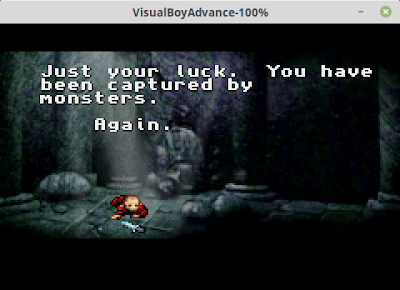
I also need to actually finish the final boss fight. I made the story cutscene that shows when you enter his room. Now I need to actually script the fight itself. I've come up with the idea of how I want the fight to work, but it's going to take a bit of work.
I've mostly pushed Atari Anguna (and my Bot-Box tutorial for Chris) to the backburner for now, trying to get closer to finishing Robo-Ninja. But I did finally sit down with Atari Anguna today and give it at least a little love, getting the next major chunk of the game engine working: enemy missiles. Well, that should really be missile singular -- I'm only supporting one missile at a time. But it only took about an hour to get them in place, so my orange slime can now shoot blobs of goo. Well, you have to use your imagination. It looks more like a dot....
I started by blogging the process of porting my homebrew game Anguna from the Gameboy Advance to the Nintendo DS. Now, my random thoughts on development and chronicling whatever hobby project catches my fancy.
Friday, April 24, 2015
Thursday, April 9, 2015
Play Services
After a lot of work trying to figure out issues with Google and Android SDK libraries, I've got the Google Play Games API working! (by "a lot of work" I mean maybe 3 or 4 hours....I guess that's not so bad)
Based on the results of the votes, the answer sounds like I should go ahead and use the games services to their full potential. Here's a test run of unlocking the first achievement!
This tutorial was super helpful in figuring out how to get started. Although there were a few hiccups that I'll document here in case the answer is helpful to anyone (or myself next time!)
First, I got all sorts of errors with not being able to find the right libraries. As many forums have mentioned, the dependencies specified in the build.gradle file have to match the SDK version that you download using the Android SDK manager. The working combination that folks are recommending as of today (Apr 2015) is the following in build.gradle:
Once that is done, I'd either need to recreate the IDEA project file (using the "idea" task in gradle), or manually add the jars for those files to the classpath in IDEA. (I'd recommend recreating the IDEA project file -- I tried adding them manually, which worked for development, but not for deploying to my phone, so I ended up having to build/deploy from the command line).
Also, the example code from the tutorial linked above is out of date for making calls to the games service. As this forum post discusses, instead of trying to use gamesHelper.getGamesClient(), you need to make static calls using the Games class:
Once I did that, I was almost there! The only other thing I had to do was go back and sign my apk with the same production key that I used to create and push the app on the play store. Once that was done, everything just worked!
Based on the results of the votes, the answer sounds like I should go ahead and use the games services to their full potential. Here's a test run of unlocking the first achievement!
This tutorial was super helpful in figuring out how to get started. Although there were a few hiccups that I'll document here in case the answer is helpful to anyone (or myself next time!)
First, I got all sorts of errors with not being able to find the right libraries. As many forums have mentioned, the dependencies specified in the build.gradle file have to match the SDK version that you download using the Android SDK manager. The working combination that folks are recommending as of today (Apr 2015) is the following in build.gradle:
compile 'com.android.support:appcompat-v7:21.0.3' compile 'com.google.android.gms:play-services:7.0.0'
With that, you need to download the v21 (Android 5.0.1) SDK in the Android SDK Manager. Also, you have to scroll ALL THE WAY TO THE BOTTOM of the SDK Manager, and find "Google Play Services" in the "Extras" folder:
Once that is done, I'd either need to recreate the IDEA project file (using the "idea" task in gradle), or manually add the jars for those files to the classpath in IDEA. (I'd recommend recreating the IDEA project file -- I tried adding them manually, which worked for development, but not for deploying to my phone, so I ended up having to build/deploy from the command line).
Also, the example code from the tutorial linked above is out of date for making calls to the games service. As this forum post discusses, instead of trying to use gamesHelper.getGamesClient(), you need to make static calls using the Games class:
Games.Achievements.unlock(gameHelper.getApiClient(), "(your achievement id)");
Once I did that, I was almost there! The only other thing I had to do was go back and sign my apk with the same production key that I used to create and push the app on the play store. Once that was done, everything just worked!
Monday, April 6, 2015
Google Play Games API
I need some input from y'all ("y'all" meaning all two of you who read this!)
I'm debating adding Google Play Game Services integration into Robo-Ninjua. Primarily for an online leaderboard (to track who beat the game with the fewest deaths), but it also adds achievements (I'd limit these to mostly how well you did when beating the game, ie "beat the game with < 500 deaths") and online saves via google drive.
So, opinions, please: how do you feel about games that connect to google's game api? Annoying? Cool?
I'm also considering, when I finally get around to releasing the game, releasing it for free, but having a "donate" version for $1 that adds a couple minor things (like a slightly harder difficultly option with 1.2x the speed, etc). I could put the play services integration only in that version, so a leaderboard would be a special feature for that.
I'm curious what people think? If you have any suggestions, please let them in the comments below, or vote/comment on the poll I set up on google+:
https://plus.google.com/+NathanTolbert/posts/FA1LCBrumup
I'm debating adding Google Play Game Services integration into Robo-Ninjua. Primarily for an online leaderboard (to track who beat the game with the fewest deaths), but it also adds achievements (I'd limit these to mostly how well you did when beating the game, ie "beat the game with < 500 deaths") and online saves via google drive.
So, opinions, please: how do you feel about games that connect to google's game api? Annoying? Cool?
I'm also considering, when I finally get around to releasing the game, releasing it for free, but having a "donate" version for $1 that adds a couple minor things (like a slightly harder difficultly option with 1.2x the speed, etc). I could put the play services integration only in that version, so a leaderboard would be a special feature for that.
I'm curious what people think? If you have any suggestions, please let them in the comments below, or vote/comment on the poll I set up on google+:
https://plus.google.com/+NathanTolbert/posts/FA1LCBrumup
Monday, March 30, 2015
Roboninja final boss
I haven't touched Roboninja in a little while, but I finally sat down the last couple nights to start on the final big thing: the boss fight.
I don't have much of it yet, but I've got a start at least: a room and a decent enemy graphic.
Now I really need to spend some design/thinking time, to figure out exactly how I want this battle to work....
I don't have much of it yet, but I've got a start at least: a room and a decent enemy graphic.
Now I really need to spend some design/thinking time, to figure out exactly how I want this battle to work....
Tuesday, March 24, 2015
2 more bytes!
I just trimmed down 2 bytes of my ram usage in Atari Anguna. Just saying.
For anyone crazy enough to care how.... I was using 2 bytes of ram to set up an indirect jmp instruction to jump to the subroutine I use to update enemies:
LDY #6 ;load the address from the enemy
;definition into the EnemyUpdateFunc LDA (EnemyDef),Y STA EnemyUpdateFunc LDY #7 LDA (EnemyDef),Y STA EnemyUpdateFunc+1 JMP (EnemyUpdateFunc) ;then jump to it
Which means that the 2 bytes for the EnemyUpdateFunc address were only used in this one particular spot. I also found another place where 2 consecutive bytes were only used for a small limited time (temporary variables used to set up the playfield while drawing the health/status header). Combining these 2 to use the same memory knocked TWO WHOLE BYTES off my ram usage. Hooray!
Tuesday, March 17, 2015
Old phone as SSH server
I guess I'm on a kick trying to actually use my pile of old broken-down smart phones.
This time, while I was at work one day and was wanting to access my home network, I was wishing I had a linux machine at home that I could ssh into. My laptop at home is linux, but I don't leave it turned on. The home server is Windows, because it's also my media center, and sadly, Windows Media Center is still the best option for a media center with DVR. I wanted to run a small, light linux machine alongside it, just to be able to get in via ssh from outside, and do whatever from there.
I had a raspberry pi at one point, which would have been perfect, but I sold it. And for things like this, part of the fun is to do it without buying more stuff. So I decided not to buy another pi. I thought about just running a linux VM on the windows machine, but it's already a bit underpowered for what it does (it gets a little slow when watching an HD recording while also simultaneously recording 2 HD shows).
So I dug around in my pile of old phones, and decided to turn one into a proper ubuntu machine. My first attempt was with a Galaxy S. I installed a fairly straightforward chroot'd linux on it, and it was SLOW. I tried doing an apt-get install of mysql, and I gave up after 15 or 20 minutes of waiting during the installation. That phone went back in the bin.
So I pulled out the LG Optimus G E970. It's more-or-less the same hardware as a Nexus 4, so quite a bit better than the old Galaxy S. Unfortunately, it has a busted screen -- the screen turns on and displays properly, but the touchscreen is completely broken. And I didn't have adb/USB debugging enabled before it broke, which has previously foiled any of my plans to do anything with it. But I decided that this time, that wouldn't stop me.
First, I tried the easy solution, and plugged in a USB OTG adapter, which, if a phone supports it, lets it act as a USB host, so I could hopefully just plug a USB mouse in. Nope, no dice. No OTG support. I have a bluetooth mouse, but how to get bluetooth turned on, and the mouse paired, without USB debugging enabled?
Well, here's what I finally did (with quite a few other mis-steps along the way that I won't bother documenting):
- Since the power and volume keys still worked, I could reboot into recovery mode, and work through those menus. So I wiped the current install, and flashed a current version of SlimRom. SlimRom, as it turns out, has USB debugging enabled out of the box.
- To disable the lockscreen from adb, I needed root access, which I didn't have. But I read that if you connect adb while in recovery mode, you have full root. So I rebooted again into recovery, connected adb, and thanks to the tips from this post, pulled the /data/data/com.android.providers.settings/databases/settings.db sqlite database off the phone onto my desktop (using the adb pull command), disabled the lockscreen by running the query update secure set value=1 where name='lockscreen.disabled'; and then pushed the file back onto the device. Once rebooted, the lockscreen was disabled.
- Next was the tricky part -- blindly stabbing in the dark with adb shell input commands to try to turn on bluetooth and pair with my bluetooth mouse. It took a bit of trial and error, but the solution for my particular phone ended up being:
#swipe down from top:
./adb shell input swipe 100 0 800 100
#tap top right to flip to the tiles settings screen:
./adb shell input tap 750 10
#hit the settings icon:
./adb shell input tap 720 150
#bluetooth toggle on:
./adb shell input tap 720 250
#tap the bluetooth menu:
./adb shell input tap 520 250
#search for devices
./adb shell input tap 600 40
#select the mouse
./adb shell input tap 200 896
After that, my mouse was working! Then it was pretty easy to attach a bluetooth keyboard, install the chrooted linux (the easiest method is to download the Complete Linux Installer from the play store, although there are plenty of bugs in it. If you are playing along at home, here's the bugs I ran into, and their solutions:
- Clicking "Start Linux" loads the terminal emulator, but nothing happens OR
- Clicking "Start Linux" loads the terminal emulator, it does a cd and su, and then nothing happens.
Something is broken with the launcher. You need to run the boot script manually. First su, then do sh /data/data/com.zpwebsites.linuxonandroid/bootscript.sh /sdcard/ubuntu/ubuntu.img (adjusting that last bit to wherever you put the linux image)
- You can't add users (and various apt-get installs also fail because THEY can't add users)
Something in Android's SELinux implementation is breaking things. In a separate terminal, as root, run setenforce 0, which will disable whatever is preventing it, and probably render your device horribly insecure. Oh well.
Once those things got sorted out, I was able to SSH into the phone, and it works just fine as an ubuntu server. It's a tiny bit slow, but nothing unreasonable. It's currently plugged into the media center to stay charged, and a port forwarded on my router to it, so I can access it from anywhere!
Mission accomplished: one more half-broken phone from my bin has a use!
Tuesday, March 10, 2015
Windows Phone as "notification screen"
I recently bought a low-end windows phone from a coworker for $10, not really having any particular plan for it, but thinking I might be able to do something cool with it. Well, for the past couple weeks, it's just been sitting on my desk collecting dust.
Until a couple days ago, I decided I wanted to try to use it as a sort of 3rd screen at work, where notifications could be shown. I've got a few things (pidgin chat windows, emails, linux desktop notifications) that I want to be aware of, but I sometimes miss. My icon for pidgin changes color when I have a new message, but sometimes it's a hassle to pop it up to the top if it's not important (and it's hard to know if it's important without seeing it!) Thunderbird shows a desktop notification on new email arrival, but that only lasts for a couple seconds; I often miss it, and then I have to go click on it to see if there's mail. 1st world problems, yes. And I'm not sure I really need to fix them. But really, I have a solution (this phone) in search of a problem, so I decided to play with it!
Catching thunderbird messages was the easy part -- there's a great thunderbird extension (Unread Count) that automatically generates a text file that contains information about how many unread messages you have in each mailbox.
For desktop notifications, I did some reading, and it looks like I needed to hook into DBus, linux's inter-process communication channel. Reading through tutorials about how to hook into it, it looked like somewhat of a hassle. So I took the easy route, and used the dbus-monitor command, which generates a text stream of all the information flowing through dbus, and piped it through a python script that just looked for libnotify notifications, and wrote the details I was interested in to a separate file.
While playing with dbus, I noticed that all pidgin messages traveled through it as well, which made it really easy to catch the sender name and text content of the latest message, and write it to a file as well.
Then I have a simple php web script that pulls the info from all these files, and builds a not-too-ugly notification page out of it.
I originally planned to just point the phone's browser to it, and have a meta-refresh on the page, but the windows phone browser kept the status/url bar open the whole time, which was ugly and wasted space. So I ended up writing a windows phone app that was merely a wrapper over a webView that reloaded the page repeatedly. Moving the refresh logic to the phone app also allows for it to keep refreshing even if the web server temporarily dies, which is handy.
So here's the finished product. Who knows if I'll actually ever look at it, or find it remotely useful. That's not really the point here, is it?
Side note: currently I have a private git repo on bitbucket where I keep all my misc rinky-dink projects. Maybe I should just make it public instead, so things like this are available to anyone that wants to look at them. I'll have to think about that. (It would mean I'd be more afraid of my hackish little quick code being judged as terrible, so I'd be nervous about throwing stuff on there willy-nilly)
Until a couple days ago, I decided I wanted to try to use it as a sort of 3rd screen at work, where notifications could be shown. I've got a few things (pidgin chat windows, emails, linux desktop notifications) that I want to be aware of, but I sometimes miss. My icon for pidgin changes color when I have a new message, but sometimes it's a hassle to pop it up to the top if it's not important (and it's hard to know if it's important without seeing it!) Thunderbird shows a desktop notification on new email arrival, but that only lasts for a couple seconds; I often miss it, and then I have to go click on it to see if there's mail. 1st world problems, yes. And I'm not sure I really need to fix them. But really, I have a solution (this phone) in search of a problem, so I decided to play with it!
Catching thunderbird messages was the easy part -- there's a great thunderbird extension (Unread Count) that automatically generates a text file that contains information about how many unread messages you have in each mailbox.
For desktop notifications, I did some reading, and it looks like I needed to hook into DBus, linux's inter-process communication channel. Reading through tutorials about how to hook into it, it looked like somewhat of a hassle. So I took the easy route, and used the dbus-monitor command, which generates a text stream of all the information flowing through dbus, and piped it through a python script that just looked for libnotify notifications, and wrote the details I was interested in to a separate file.
While playing with dbus, I noticed that all pidgin messages traveled through it as well, which made it really easy to catch the sender name and text content of the latest message, and write it to a file as well.
Then I have a simple php web script that pulls the info from all these files, and builds a not-too-ugly notification page out of it.
I originally planned to just point the phone's browser to it, and have a meta-refresh on the page, but the windows phone browser kept the status/url bar open the whole time, which was ugly and wasted space. So I ended up writing a windows phone app that was merely a wrapper over a webView that reloaded the page repeatedly. Moving the refresh logic to the phone app also allows for it to keep refreshing even if the web server temporarily dies, which is handy.
So here's the finished product. Who knows if I'll actually ever look at it, or find it remotely useful. That's not really the point here, is it?
Side note: currently I have a private git repo on bitbucket where I keep all my misc rinky-dink projects. Maybe I should just make it public instead, so things like this are available to anyone that wants to look at them. I'll have to think about that. (It would mean I'd be more afraid of my hackish little quick code being judged as terrible, so I'd be nervous about throwing stuff on there willy-nilly)
Subscribe to:
Posts (Atom)
NES Anguna
Well, I had a little bit of time still, while Frankengraphics is finishing up her game Project Blue, to have a little downtime on Halcyon, s...
-
So I've recently purchased DosBox Turbo , the best (as far as I can find) implementation of DosBox for Android, and have been playing th...
-
When I'm too tired/frustrated to work on my NES game, I've been playing around with ideas for another hobby project that I've he...
-
The real trick for Spacey McRacey (as I'm calling it now) is going to be making it fun. And that's what I'm rather unsure about...